Domains
Public HTTPS addresses for your services.
Domain changes apply at once, without a deploy. Ports 80 and 443 must be
reachable from the internet.
Generated domain
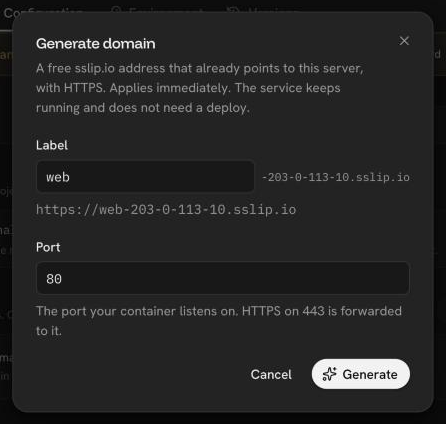
Every service gets a free sslip.io domain that already points to the server,
with HTTPS. You can change its label, or remove it and generate a new one
later.
Custom domain
- Add the domain, for example
app.example.com, to the service. - Create the DNS
Arecord the console shows, pointing to the server's public IPv4, at your DNS provider. - Once the record resolves, Let's Encrypt issues the certificate. This usually takes under a minute and at most 10.
Nothing is routed until the record resolves. The console checks it in the
background, so you can close the dialog and come back later. If your domain
has a CAA record, it must allow letsencrypt.org.
Port
HTTPS on 443 is forwarded to the port your container listens on, for example
8080. Set it per domain.
Was this page helpful?
Last updated on