Volumes
Persistent files for Docker services.
A Docker service can mount up to 10 volumes of 1–100 GiB each. Add them in the service's Configuration, with:
- an absolute path inside the container;
- a size;
- a storage profile, fixed once the volume exists.
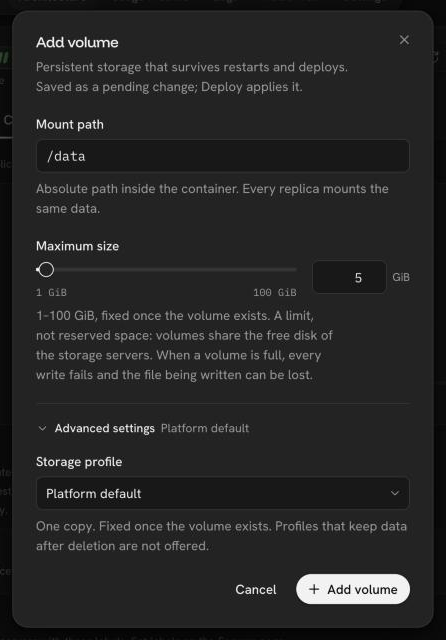
Volumes are part of the service's configuration: they are created, moved to a new path and deleted by the next deploy. A rollback restores everything else and leaves volumes as they are.
One replica
A volume is attached to one server at a time. A service with volumes runs one replica and is redeployed by stopping the old instance before starting the new one, so each deploy and restart has a short pause.
Size and usage
The size is the real size of the volume's file system. Volumes are thin: they share the servers' free disk until written. A full volume answers writes with "no space left on device", like any full disk.
The service card and Configuration show how full each volume is, refreshed every minute. From 85% the card shows a warning, and from 95% the bar turns red.
Not supported yet
Resizing a volume, and moving it to another storage profile.
Was this page helpful?
Last updated on